

How do you define a webhook action?
Point an event listener at a webhook URL, fire it from the Composer, and read the payload it posts.
Platform v0.x
Summary
This how-to guide explains creating an event listener with a webhook action.
Prerequisites
- ✅ We recommend you complete the event listener Getting Started.
Define a new event listener
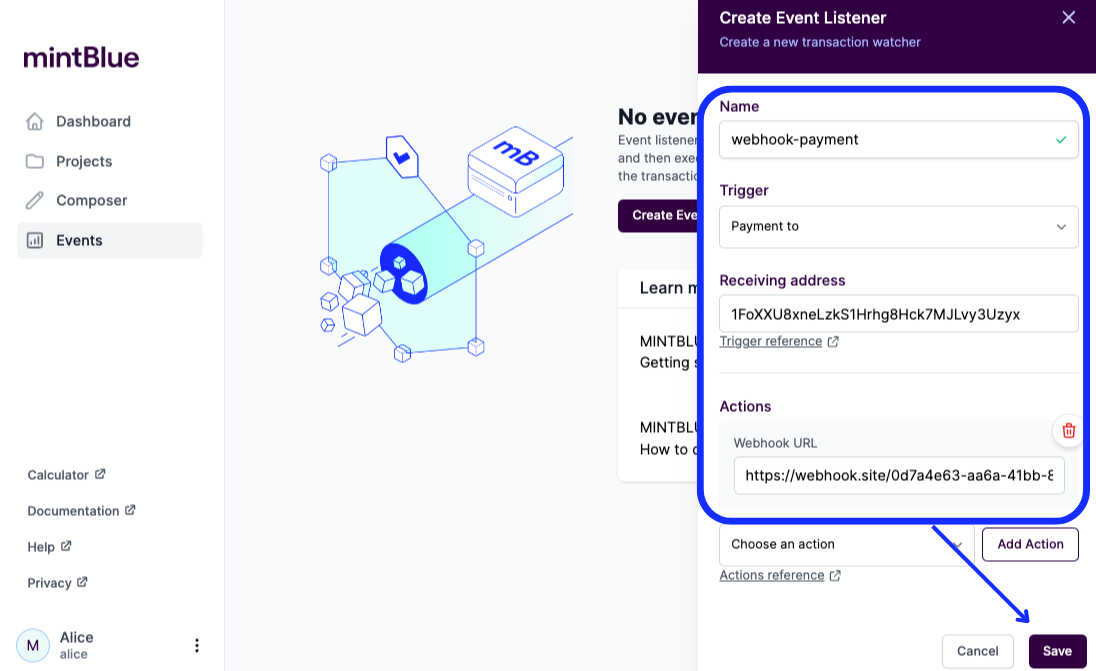
First, define a new event listener. Let's use the same trigger as the Getting Started tutorial:
- Type:
Payment To - Trigger Options:
12c6DSiU4Rq3P4ZxziKxzrL5LmMBrzjrJX
Next, we need to pick an action. Here, select the Webhook option from the dropdown. Then, we need to specify a webhook URL. You can use an online webhook testing website like https://webhook.site/ to create a quick webhook. It hands you a URL of the form https://webhook.site/<your-token>, which is the value used in the examples below. Make sure to click the Save button.
Verify the event listener
To verify our new webhook event listener, let's use the mintBlue Composer to send a payment transaction to 12c6DSiU4Rq3P4ZxziKxzrL5LmMBrzjrJX.
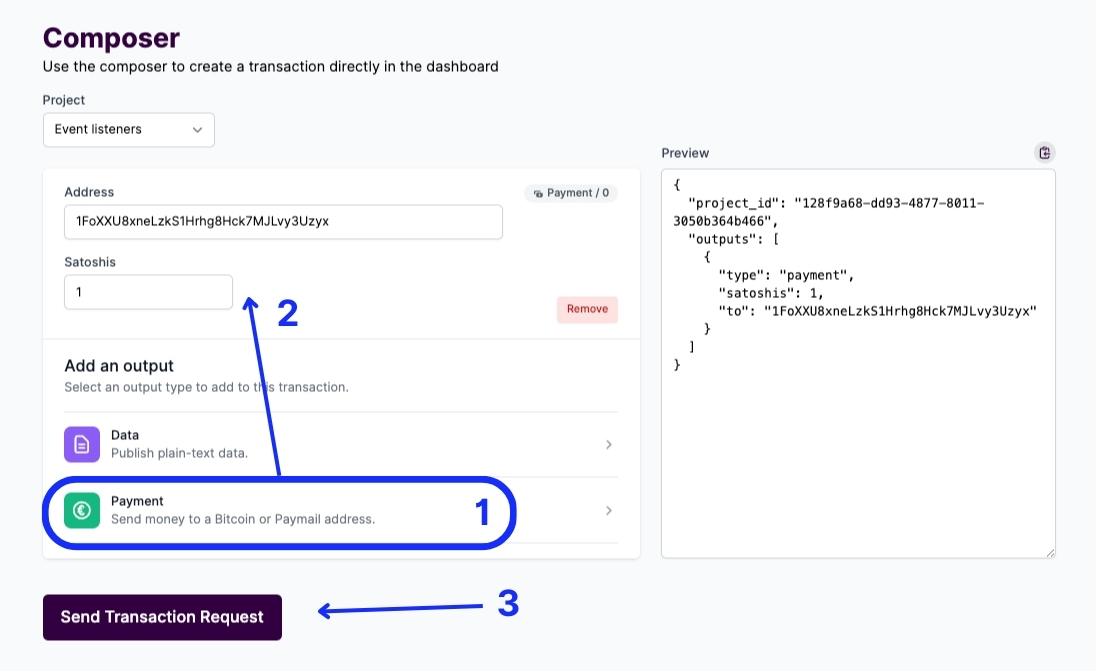
When everything goes well, your webhook should receive a JSON object like below.
{
  "version": 1,
  "subscription": {
    "id": "f924651e-5868-4bc9-854f-a9c917182e49",
    "name": "Webhook",
    "trigger": {
      "type": "PAYMENT_TO",
      "options": {
        "to_address": "12c6DSiU4Rq3P4ZxziKxzrL5LmMBrzjrJX"
      }
    },
    "actions": [
      {
        "type": "webhook",
        "options": {
          "url": "https://webhook.site/<your-token>"
        }
      }
    ],
    "user_id": "71e9ecab-7e59-4bee-830a-eb986f97d333",
    "account_id": "0362ecda-7ec0-4d0f-9a9e-2ce8035b9d76",
    "createdAt": "2023-12-18T20:16:06.132Z",
    "updatedAt": "2023-12-18T20:16:06.132Z"
  },
  "event": {
    "_source_type": "mintblue",
    "topic": "mintblue.transaction.inserted",
    "content": {
      "txid": "5acbe0664fbf2458f7ca8a50cc7d9a197885d401c5692987bd2039522a1fd690",
      "project_id": "128f9a68-dd93-4877-8011-3050b364b466",
      "user_id": "71e9ecab-7e59-4bee-830a-eb986f97d333",
      "account_id": "0362ecda-7ec0-4d0f-9a9e-2ce8035b9d76"
    }
  },
  "includeRawtx": false
}
Optional: Include raw transaction data
If you want to receive the rawtx, you can add a ?rawtx=1 option to the webhook URL, like this: https://webhook.site/<your-token>?rawtx=1
You'll find the rawtx under event.content.rawtx attribute.
{
  "version": 1,
  "subscription": {
    "id": "64ce89d9-6355-475b-a1be-d93cf0b0c559",
    "name": "webhook-2",
    "trigger": {
      "type": "PAYMENT_TO",
      "options": {
        "to_address": "12c6DSiU4Rq3P4ZxziKxzrL5LmMBrzjrJX"
      }
    },
    "actions": [
      {
        "type": "webhook",
        "options": {
          "url": "https://webhook.site/<your-token>?rawtx=1"
        }
      }
    ],
    "user_id": "71e9ecab-7e59-4bee-830a-eb986f97d333",
    "account_id": "0362ecda-7ec0-4d0f-9a9e-2ce8035b9d76",
    "createdAt": "2023-12-18T20:41:01.056Z",
    "updatedAt": "2023-12-18T20:41:01.056Z"
  },
  "event": {
    "_source_type": "mintblue",
    "topic": "mintblue.transaction.inserted",
    "content": {
      "txid": "13b63578300a150f6f5fde89a3a7adf5f5147de7121840d7656fb690842c80f5",
      "rawtx": "01000000018107066b202a6862b8bc4783203a90d541074bb2551aaf5ab90e5926124aada5010000006b483045022100847c65c74141abc7ebc6dbbf32da2d1f0003a87fbd7cd253b5b227edec5be1c7022038a6e45de1d44b85f1ab85133f9069032e8b9f522edd1646c35cd15f479475fb41210216daa6708bbad45dc91145d60567c45f1aaf19a667202d03a44611751677b64bffffffff0201000000000000001976a914a25e605fa437f5b7104418f0ae3f99d4713fd05288ac92390000000000001976a914c46d1b4cbd279e43d0c478ffd7492bd55b40cf9588ac00000000",
      "project_id": "128f9a68-dd93-4877-8011-3050b364b466",
      "user_id": "71e9ecab-7e59-4bee-830a-eb986f97d333",
      "account_id": "0362ecda-7ec0-4d0f-9a9e-2ce8035b9d76"
    }
  },
  "includeRawtx": true
}